A CRM That Speaks Your Trade: 73 Industry Profiles for Capturing the Right Lead Details
A real estate broker needs budget, locality and loan status. A visa consultant needs destination, funds position and prior refusals. One set of CRM fields can't serve both — so don't make it.
Co-Founder, Aidavo
Most CRMs are designed for nobody in particular. You get a contact, a deal value, a stage called “Qualified” and a notes box — and then you spend a weekend adding custom fields, or, more likely, you don't, and your team types everything into the notes box.
That's the quiet reason CRMs fail at small businesses. The fields don't match how the business sells, so nobody fills them, so the data is useless. Ultraphone takes the opposite approach: pick your trade, and the system already knows what to listen for on every call.
What's in an industry profile
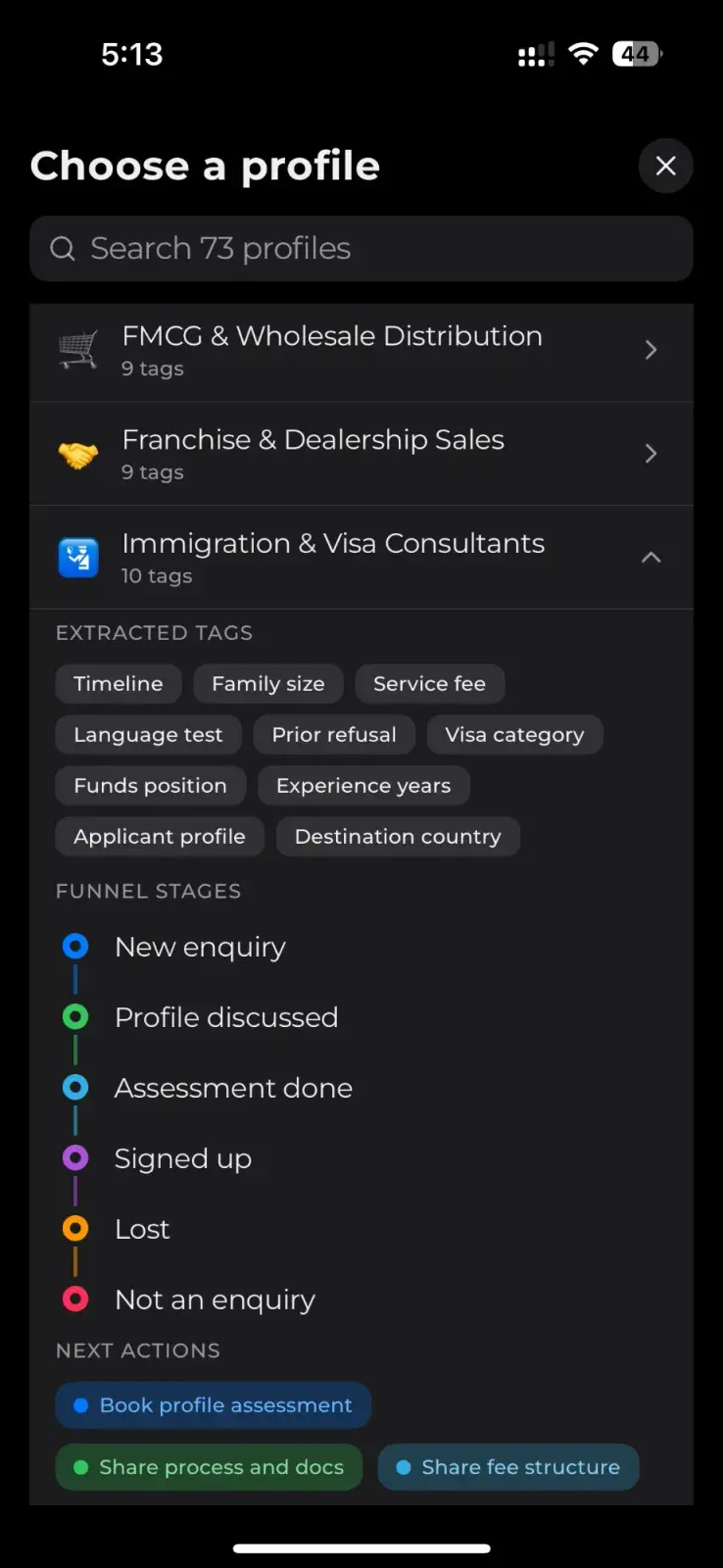
Ultraphone ships with 73 industry profiles, from real estate brokers and dental clinics to FMCG distributors and immigration consultants. Each one has three parts:
- Extracted tags — the details the AI pulls out of each call. For a visa consultancy: destination country, visa category, funds position, language test, prior refusal, family size.
- Funnel stages — the steps a lead in that trade actually moves through, from “New enquiry” to “Signed up”, including honest exits like “Lost” and “Not an enquiry”.
- Next actions — the handful of things a salesperson in that trade does to move a deal forward, like “Book profile assessment” or “Share fee structure”.
01 · Listens for
02 · Moves through
- New enquiry
- Profile discussed
- Assessment done
- Signed up
- Lost
- Not an enquiry
03 · Next actions
Why industry-specific fields matter
Take one sentence a caller might say: “We need it before the wedding in February.” For a banquet hall, that's an event date and the most important field on the lead. For a jeweller, it's a purchase deadline. For a packers-and-movers business, it's probably irrelevant. A generic CRM can't tell the difference. A profile can.
The same goes for scoring. A lead that mentions a prior visa refusal is a harder case for an immigration consultant; a lead that mentions a pre-approved home loan is a stronger one for a broker. Because the AI lead score is calculated against your profile, it weighs what matters in your trade.
A few of the 73 profiles
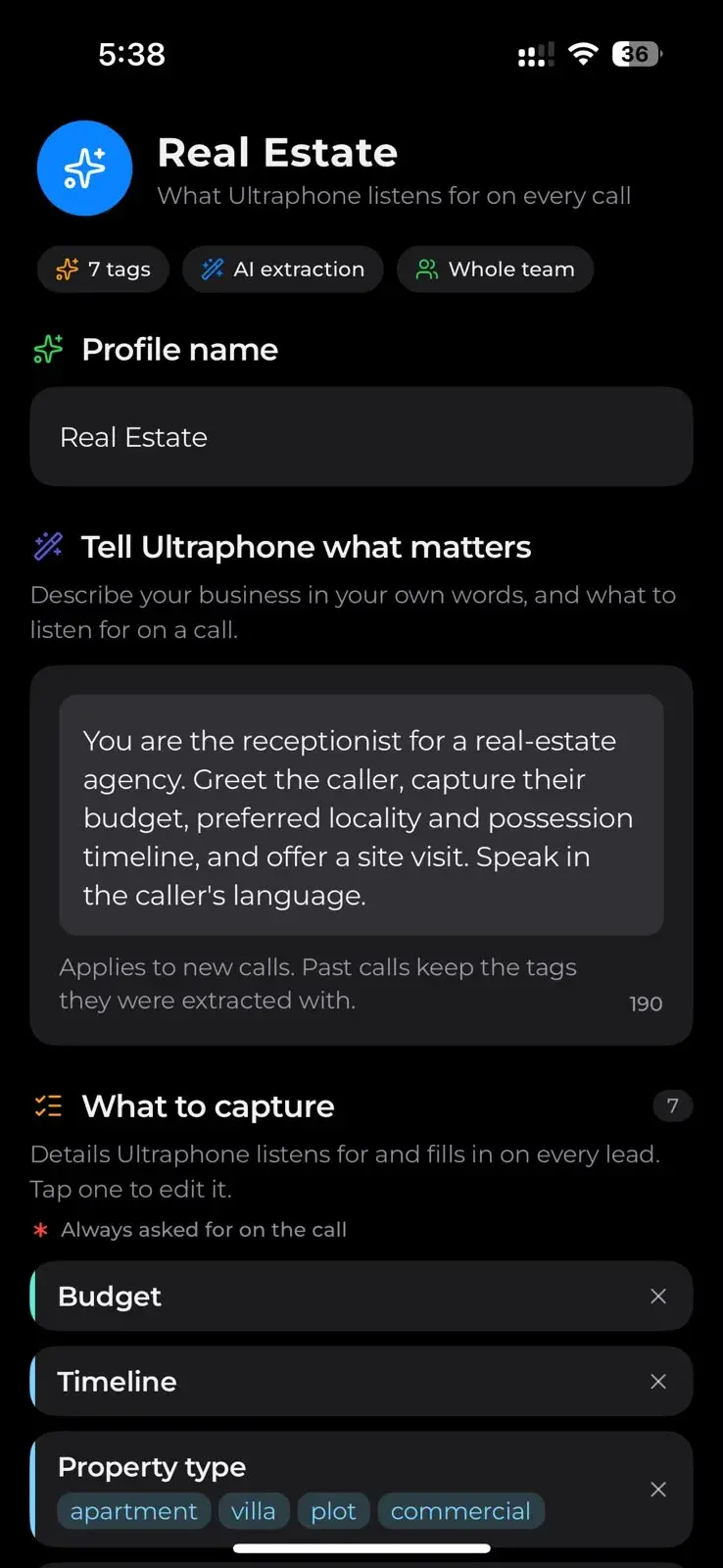
- Real Estate Agents & Brokers: intent (buy, rent, sell, investment), budget, configuration, property type, locality, loan status, buyer profile, site visit status, timeline.
- Modular Kitchen & Wardrobes: scope, budget, running feet, kitchen layout.
- Immigration & Visa Consultants: destination country, visa category, applicant profile, experience years, funds position, language test, prior refusal, family size, timeline, service fee.
- FMCG & Wholesale Distribution and Franchise & Dealership Sales: nine tags each, built around order size, territory and terms.
- Generic Sales: a sensible default when your trade isn't listed yet.
Make it yours in plain words
A profile is a starting point, not a cage. In Customisation, you tell Ultraphone what matters in your own words — “always note which branch they want to visit” — and edit the fields to capture. Changes apply to new calls; past calls keep the tags they were extracted with, so your history stays consistent.
Choosing the right profile
- Pick by how you sell, not what you sell. A furniture maker selling to builders should look at a B2B profile, not the retail one.
- Open it before you switch. Every profile shows its tags, stages and actions, so you can check it asks the questions your team asks.
- Start close, then edit. Two or three tweaks in Customisation beat building fields from scratch.
The best CRM field is one nobody has to fill in. Pick your trade, and every call writes up the details your business actually uses — in the stages and actions your team already works in.
Frequently asked questions
- Does Ultraphone work for my industry?
- Most likely. Ultraphone includes 73 industry profiles, covering real estate, clinics, coaching institutes, interiors, automobile dealers, B2B distribution, immigration consultants and many more, plus a Generic Sales profile. Each profile can be customised.
- What is an industry profile in Ultraphone?
- A profile is a preset of the details Ultraphone extracts from calls, the funnel stages a lead moves through, and the next actions your team can take — all tailored to one kind of business.
- Can I add my own lead fields?
- Yes. In Customisation you describe what matters in plain words and edit the fields to capture. Changes apply to new calls; earlier calls keep the tags they were originally extracted with.
- Can I switch profiles later?
- Yes. You can open any of the profiles to review its tags, stages and actions, and switch when it fits better. New calls use the new profile.